

sapio365 - Resources
sapio365
All Resources
sapio365 provides you with detailed insights into every aspect of your Microsoft 365 environment.
Here are some supporting materials to help you understand how to maximize the value you can get from your digital environment.
How can
we help you today?
FAQ
Have a question about sapio365? You may find your answer below in our Frequently Asked Questions.
Webcasts
We have a series of webcasts where you can learn how to get the most out of your software.
Case Studies
Learn how other customers and MSPs are using the sapio365 solution to simplify the management of their complex, multi-tenant environments.
Feature History
Check below to see the latest features that have been added to sapio365. See the full version history here.
Documentation
Find more resources to help you understand how sapio365 can be used across your organization.
Customer Support Portal
Get technical support. Report any bugs, or request an improvement. Or, just ask a question.
sapio365 support
Contact the Ytria team
sapio365 can be tailored to the individual needs of your business.
Contact us at Ytria if you want to find out more about how it can help you.

sapio365 - Pricing
sapio365 Annual Subscriptions
Pricing as low as $840 a year for 300 Microsoft 365 licensed users.
1 Admin seat
US $2.80 / user yearly
300 users minimum
Special pricing available for more than 1,000 Microsoft 365 licensed users, please contact us.
Up to 5 Admin seats
US $5.30 / user yearly
300 users minimum
Special pricing available for more than 1,000 Microsoft 365 licensed users, please contact us.
Unlimited Admin seats
US $8.00 / user yearly
300 users minimum
Special pricing available for more than 1,000 Microsoft 365 licensed users, please contact us.
Choose your sapio365 subscription now and start solving your Microsoft 365 challenges in only a few clicks!
Admins refers to the persons using sapio365.
Prices in USD and valid for all regions.
All prices are for a one-year subscription.
sapio365 follows a SaaS model.
FAQ
Yes, if the number of users in your organization has changed, we’ll adjust your license according to the new number of users. You can make an adjustment directly in sapio365 once a month. Click here to learn more about changing your sapio365 license capacity.
Since sapio365 pricing is built on a SaaS model, you can choose to be invoiced monthly without committing for a full year. Contact us for more information.
Yes! On-premises Active Directory access is currently included in your sapio365 license. It allows complete management of a hybrid Active Directory environment. sapio365 lets you retrieve data in your local Active Directory and consolidate it with data from Azure Active Directory (Microsoft Entra ID). From this single interface, you can manage both cloud and on-prem data directly in Azure Active Directory or in your local Active Directory. Click here to learn how easy it is to connect sapio365 to your local Active Directory.
sapio365 is a great choice for MSPs! If you manage several customer tenants, we have a solution to fit your budget. Share your needs and your contact information in our online chat (bottom right) or contact us to fill out a form and we’ll get in touch with you.
If you have less than 300 users and want 1 admin, your price would be US $840/year.
sapio365 - Use cases

Are these the type of
Microsoft 365 admin challenges you
thought you couldn’t solve?
Are these the type of Microsoft 365 challenges you thought you couldn’t solve?
Real-life challenges that
sapio365 solves
Offboarding is a time sensitive operation that must follow strict and detailed procedures to ensure access to confidential information is no longer available to ex-employees. Their access must be revoked quickly. Doing this without a PowerShell script takes too long yet using a script is risky and can lead to errors.
With sapio365 and an HR file in hand, you can:
- Select and target the employees scheduled for layoff in less than a minute
- Transfer user files and emails to a designated manager
- Ensure confidential information is no longer available to ex-employees
Without having to write or search for PowerShell scripts, you’ll automatically address security issues, and retain the documents and emails you need. The best part is you’ll do it all in just one click.
Onboarding and offboarding employees can take up a lot of IT admin time. Not all admins are PowerShell experts and using a public script is risky. It can result in errors that take hours of work to fix.
Using sapio365 can streamline the process by offering:
- A global view of all your data so you can select users without errors
- The ability to preview any changes before saving them
- A process to automate and customize your processes
You can now onboard and offload employees with just one click. Unnecessary risks are eliminated, and you can get a report confirming that the user account was processed successfully.

Employees who don’t register their multi-factor authentication (MFA) methods or information can cause security breaches. To close these security gaps, you need to identify which employees have missing MFA information but using the Microsoft 365 admin portal is difficult and PowerShell scripts are risky.
The good news is that sapio365 gives you an extensive view of your MFA situation:
- Gain a view of all users and their registered methods in one place
- Identify which employees have missing MFA information and take corrective action
- Avoid having to use the Microsoft admin portal or PowerShell
You’ve established a new security protocol and lowered the risk associated with the most common security gaps in Microsoft 365, without having to use PowerShell.
It’s tough to manage disorganized Microsoft 365 environment, especially ones that have more old user accounts than active accounts. With so much to do, it’s impossible to find the time to delete the accounts and do a clean-up in the tenant.
sapio365 helps you de-clutter your tenant easily with just a few clicks of the mouse:
- See all users and their attributes at once all in one place
- Verify if old accounts have licenses assigned
- Verify if old accounts belong to groups
- Archive any files associated with the old accounts
- Create and save a customized view
- Schedule a report based on your customized view to run automatically
You have deleted your old user accounts and decluttered your tenant and it only took minutes instead of hours.
IT admins are often tasked with finding cost-cutting opportunities by identifying and re-assigning unused or under-utilized licenses. Gathering the necessary information to run this kind of report is difficult and time-consuming as the information needs to be gathered.
Running that report using sapio365 will allow you to save hours of time and avoid risky errors.
- Gain a global view of users, organized by department, type of license, usage and cost to the company
- Pinpoint how many licenses are assigned to users on leave or no longer with the company
- Remove unused licenses, including ones assigned through groups, in just a few clicks
- Avoid the risk of PowerShell scripts
By eliminating the need for a PowerShell script, you lowered the risk of unexpected errors. More importantly, instead of spending hours on this task, you completed it in less than 15 minutes.
A lot of user data is spread across the Microsoft 365 native user interface. The challenge for many IT admins is to find and gather specific data or data they many not even know about. It’s frustrating having to deal with annoying pagination issues.
A software tool like sapio365 helps you aggregate any kind of user data easily:
- Gain a full and broad-ranging view of all user information in one place
- Reorganize the data however you want then take corrective action in a few clicks
- Avoid risk of manual errors
With the data available at your fingertips, you can create a spreadsheet with all the data you need, organized the way you want it. Finding data will be quick and easy moving forward and you won’t have to deal with the native user interface.
IT admins have to make sure new corporate policies are enforced efficiently, such as ensuring that Teams is the only software used for employee collaboration and meetings. To ensure that users are not using less secure communications platforms, a report on Teams usage frequency by department.
sapio365 will allow you to quickly prepare a customized report on Teams activity:
- View each users’ activity by department or any other parameter you choose
- Schedule a report to be run and sent automatically
- Avoid risk of manual errors
With this data, you can arrange to have a report sent to the CIO every Monday morning, without waiting to be asked, and it will take only minutes.
Removing guests, consultants and non-employees from Teams involves changing the Teams settings. It can be detailed and pain-staking work as you will have to sift through all the Teams to identify which Teams have guests and then change the settings on each one.
sapio365 allows you to see all the data and take bulk action securely by previewing your changes before saving them:
- See all Microsoft 365 Teams in a full and extensive view
- Pinpoint Teams that do not have appropriate settings
- Take corrective actions in minutes
Removing all the guests and external users from the affected Teams can be done in one click, and without having to write or search for a PowerShell script.
Sensitive documents are often stored in Teams channels, but they can be easily shared if the Teams channel is not private. To make sure private and sensitive documents are only shared by approved personnel you will need to find all the private channels and report on the members in those channels and remove employees who should not be there. Doing this is labour intensive and it’s easy to miss a Team.
With sapio365 and some guidance from HR, you can find the Teams easily and remove members from private channels accurately:
- Gain a view of all Teams and channels in one view
- Filter to see private channels only and review their members
- Flag members who may not be approved to share documents
- Remove unapproved members in one click
By using sapio365, you‘ve avoided the need for PowerShell experts or scripts. The whole process took only minutes, and you can schedule that same report to run automatically on a schedule of your choosing.
Some companies do not want employees forwarding emails to their personal email addresses but to enforce that rule requires examining employees’ inbox rules. If you have a lot of users, you will need a sophisticated PowerShell script. When there are a lot of users, there is a risk of the script having to re-authenticate every hour as it filters through all employee inboxes.
Avoid re-authentication issues while finding the information you need more efficiently:
- Gain a global view of all employee inbox rules
- Filter using whichever parameters you want
- Automate the process to run as often as you like
- Schedule a report to be sent automatically
With no manual work required, this task is a one-click process that is error-free. Accuracy and efficiency have been improved an no PowerShell script was involved.
Delegating specific IT tasks to other team members is a great way to offload work but it can also increase risk. Microsoft Administrative Units do not allow you to segment roles as required because they are based on only one parameter. The permissions are either too broad or too narrow.
With sapio365 and its Role-Based-Access Control (RBAC) you can delegate safely:
- Create custom roles according to task requirements and scope
- Assign roles with actions and target sets that are exactly as wide or as narrow as you need
- Assign roles to groups or across multiple tenants
- See all roles in a centralized view
- Use automation to assign tasks to non-technical personnel
By delegating safely, you have empowered many members of your staff while at the same time offloading many of your own tasks. You can now focus on more important and strategic tasks.
Many of the tasks performed by Microsoft 365 admins are routine and tedious, like running reports for example. By using automation for your day-to-day IT administration tasks, you can reduce your workload and save hours of time every day.
Use automation and scheduling to lessen your workload:
- Automate reports, charts, and other actions and execute with one mouse click
- Generate reports based on real-time data
- Automate jobs and delegate them to non-technical staff
- Choose from a growing library of ready-to-run jobs from our Automated Jobs Library
- Create your own custom automation
- Schedule mass updates to occur during off hours
By incorporating automation with sapio365, you can automate as many repetitive tasks as you choose. These automations can save you hours of time every day that can allocated to other value-added jobs.
Running different reports in a hybrid environment when the accounts are on premises can be difficult as you will have to use the Active Directory Users and Computers (ADUC). It allows you to see only one account at a time and check each account for the specific data you need. The process is tedious and error-prone but using a PowerShell is also risky.
Using sapio365 to run reports without worrying about synchronization issues between cloud and on-prem accounts.
- See all users accounts and their attributes, whether they are on-prem or on the cloud
- Identify old users using whichever parameters you choose, such as last log on or password change
- Manipulate the data and organize it according to your reporting needs
- Save your customized view and export the data to an Excel spreadsheet
Without having to engage a PowerShell expert or use any PowerShell scripts, you have created a custom, error-free report that you can run anytime. Preparing the report took only minutes, instead of hours.
Running reports when you’re an IT admin in a large organization with multiple tenants means having to sign in and out, which is not practical, or using different browsers which is annoying. If you need to run reports collating data from various admin portals across all the tenants you manage, this issue will impact your regularly.
By using sapio365, you won’t have to repeatedly copy and paste data or log in and out constantly.
- See the data for each tenant on one screen and make changes easily
- Create sessions for each tenant and switch between tenants without logging out
- Run multiple independent instances so you’re connected to each tenant simultaneously
- Run automated cross-tenant reports
You have saved yourself the frustration of bouncing in and out of tenants while still managing to collect the data you need and prepare a report – all in just a few clicks.
Employees’ calendars can get crowded and hard to manage when they are added to meetings automatically and sometimes incorrectly. To clean up employees’ calendars manually using the admin portal is very difficult to do, especially when there is a large user community, and using PowerShell is always risky and can lead to errors if you are not a PowerShell expert.
Using sapio365, you can clean up the calendars easily:
- Use filters to get a list of the employees with affected calendars
- View all the calendar details in one place
- Edit or remove recurrent meetings
Review all your changes before saving them to avoid unexpected errors, then create a customized report on your results, all in just a few clicks.
From time to time, older registered applications that are not being used need to be removed from the Microsoft Entra ID so it doesn’t become cluttered. However, doing so is tedious because applications cannot be deleted in bulk.
A tool like sapio365 allows you to:
- See all the registered applications and their properties in one place
- Pinpoint the targeted applications according to the properties you choose
- Select, edit or delete multiple applications at one time
You’ll be left with a clutter-free environment where outdated applications that could pose security risks will have been removed quickly and easily.
An inventory of all registered devices should be performed periodically so that IT admins can keep track of these devices. An inventory will provide information about which devices may be outdated and need to be replaced but aggregating all the relevant data takes time and the Microsoft Entra admin center will only give you limited details.
With sapio365, you’ll be able to view all the devices and their properties.
- Gain a view of over 50 additional properties, all in one place
- Use filtering, grouping and sorting capabilities to manipulate the data in whichever way you want
- Export your data to Excel so you can report on it
Your users will benefit from updated models and operating systems so their performance is enhanced, and you can be sure all devices are compliant.
IT Admins everywhere share the same frustrations with issues that ruin productivity, create bottlenecks and cause unnecessary risks. With sapio365, you become ultra-efficient, lower risk and get the most out of Microsoft 365.
Related Articles
Nothing found.
sapio365 - Overview

A Microsoft Office 365 Admin Tool
For teams that need to solve challenges
they thought were impossible…
without relying on PowerShell scripts
A Microsoft Office 365 Admin Tool
For teams that need to solve challenges they thought were impossible…
without relying on PowerShell scripts
sapio365
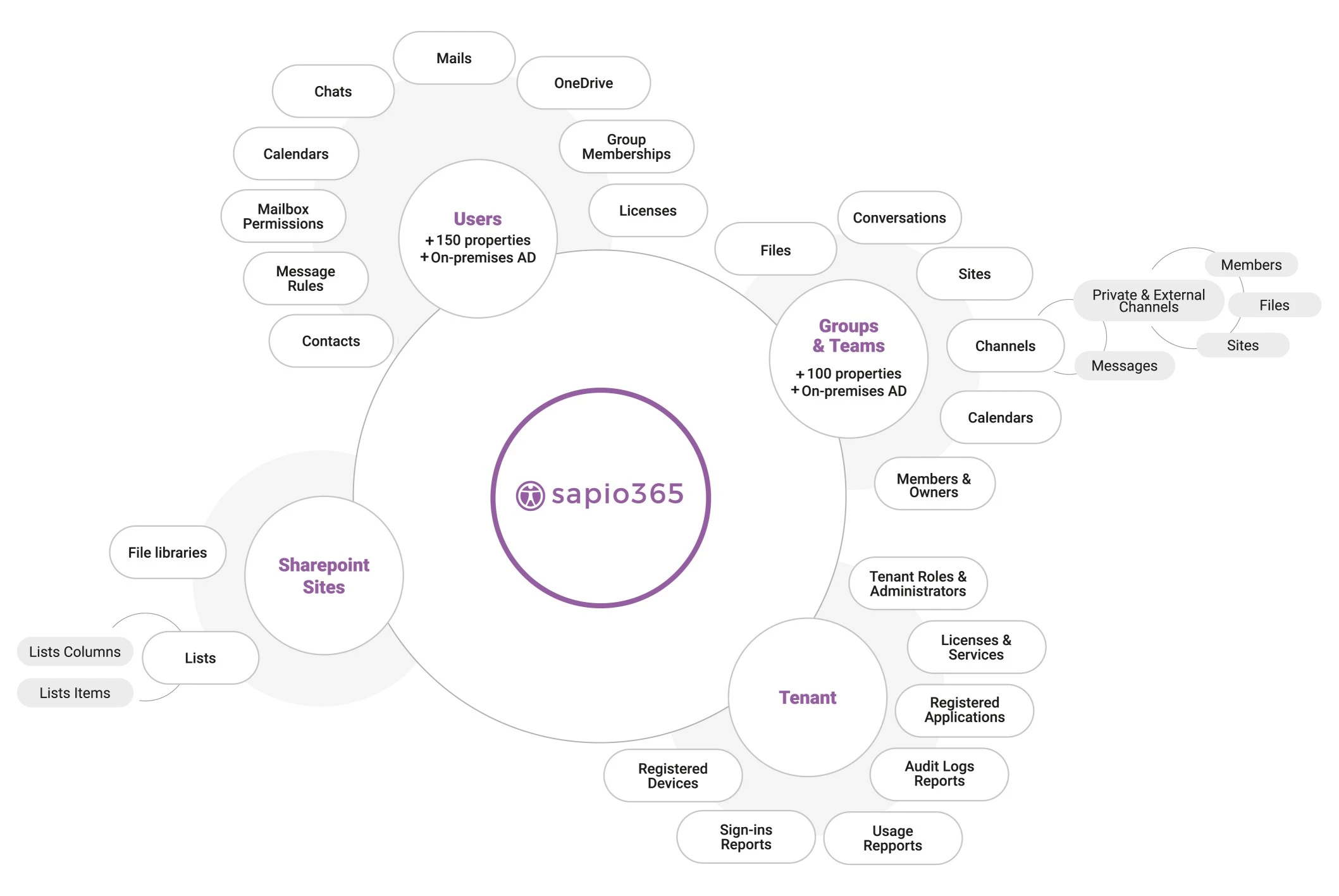
empowers you to manage Microsoft 365 easily, without using PowerShell
Full Visibility & 100% control
See everything across all tenants, yet avoid information overload. Organize your data to see patterns, analyze data, compare and aggregate easily.
Speed up decision-making and save hours of time every day.
Easy problem tracking & isolation
Drill down to find the specific piece of information you need. Identify, isolate and fix lurking problems without using PowerShell.
Perform bulk actions safely
Streamline tasks and make multiple changes at the same time. Preview and fix issues without making damaging errors. Solve use cases that seem impossible.
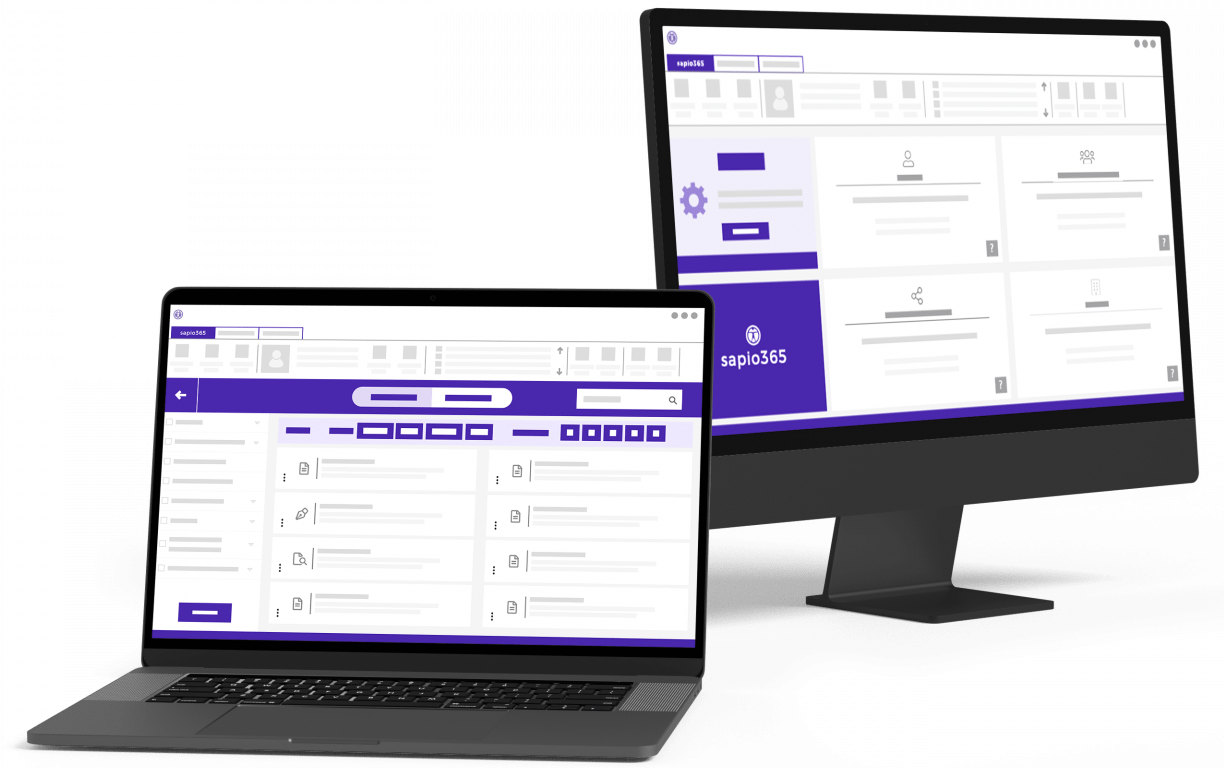
See all your data at once, drill down as deep as you want.
sapio365
empowers you to manage Microsoft 365 easily, without using PowerShell
Full Visibility & 100% control
See everything across all tenants, yet avoid information overload. Organize your data to see patterns, analyze data, compare and aggregate easily.
Speed up decision-making and save hours of time every day.
Easy problem tracking & isolation
Drill down to find the specific piece of information you need. Identify, isolate and fix lurking problems without using PowerShell.
Perform bulk actions safely
Streamline tasks and make multiple changes at the same time. Preview and fix issues without making damaging errors. Solve use cases that seem impossible.
See all your data at once, drill down as deep as you want.
Why Choose sapio365?
Fastest way to explore your data
Discover hidden information with unmatched speed and agility. Navigate, sort, filter and categorize your Microsoft 365 tenant data with our flexible and actionable grid view.
Secure desktop application
sapio365 is way more secure than cloud-based solutions. Your data always stays within your secured environment and no third parties ever have access to it.
Seamless management of hybrid Microsoft 365 environments
Ensure flawless integration of your on-prem and cloud environment from a single interface. Unify all your data from Entra ID, Exchange Online, Active Directory and Exchange on premises.
Highly granular RBAC delegation
Delegate admin tasks securely without granting administrator access privileges. Define roles as narrow or as wide as you want as you offload common tasks to helpdesk or non-IT personnel.
Segmented tenant administration
Allow administrators from specific regional office or departments to view data, run reports and perform account updates for the area they support.
Easy multi-tenant administration
No need to log in and out of different Microsoft 365 tenants or use multiple browsers. You can manage multiple tenants easily without having to re-enter credentials.
Simplified automation
Leverage our automated job library. Common IT tasks like onboarding and offboarding are automated allowing you to save hours of time.
Easy scalability
Whether you have 50 users or thousands, sapio365 is the best Microsoft Office 365 admin tool for tackling the toughest Microsoft 365 tasks.
Supports GCC High tenants
sapio365 supports the stringent requirements of organizations with GCC High environments.
Access to detailed group and user content
Find all types of data, including email, attachments, inbox rules, chats, OneDrive and SharePoint documents and more.
It’s all about clicks – not writing code.
sapio365 is a Microsoft Office 365 admin tool that transforms the way you work.

Where can sapio365 make a huge difference?
Avoid having to go into various M365 admin center portals to make manual changes. Manage the full user lifecycle from one place by using automation.
- Automate onboarding and offboarding, license assignment, mailbox management and group memberships
- Compare and manage both cloud and on-prem Active Directory user data in one place (hybrid AD)
- Correct or add user information directly from a CSV or Excel file
- Audit and export users’ chats and chat messages
- Keep control over mailbox and calendar contents
- Manage password resets, sign-ins and MFA enforcement
Eliminate manual errors and limit the number of user complaints.

Take control of messy and challenging navigation. Limit the overwhelming number of requests to fix user errors when assigning groups of Teams.
- Find inactive and obsolete groups and remove them in minutes
- Make mass assignments to groups in one click
- Manage all aspects of groups in one place
- Manage guest access and other group settings
- Oversee group members from different groups all in one place
- Mass create and bulk edit groups in one click
- Easily manage members of several private and shared channels at once
- Compare and manage both cloud and on-prem Active Directory group data in one place (hybrid AD)
Control the sprawl of groups and Teams and give your users a better experience.

Control access to online documents that are too easily shared in non-secure ways.
- Gain instant access to documents where you are not an owner
- View the whole list of documents across all libraries and how they are shared
- Correct inappropriate sharing with a single click
- Check-in important documents checked-out by out-of-office users
- Download or upload documents and whole folders across sites or OneDrives
Eliminate data leaks and always know who shared what and with whom.

Gain global insight about how many Microsoft 365 licenses are properly assigned.
- Gain insight into how licenses are assigned (directly or through group)
- Identify under-utilized activated licenses that can be downgraded
- Identify obsolete or inactive accounts that still have licenses assigned to them
- Analyze and report on license costs by setting license unit costs
- Easily free-up many licenses with one click without making any mistakes
- Delegate the ability to manage not only the type of license but also the number of licenses using sapio365’s role-based access control
Stop wasting under-utilized licenses and reduce overspend.

Find the information you need quickly by gaining access to content, settings and other information – without becoming the mailbox owner.
- See the metadata of emails, including recipient list, subject, sent date, attachment type, etc.
- Edit or delete email messages
- Download email messages in EML format (viewable in any mail client)
- Copy or move emails to other folders
- Download or delete email attachments
- See who has what kind of access to mailboxes.
- Remove or give mailbox Full Access to users or security groups
- Search for related emails across mailboxes
- Hard-delete targeted emails
Leverage the ability to drill down and obtain granular information about user communications quickly and easily.

View and access all calendar information without having to become the calendar owner.
- See metadata of users’ meetings, like participants, organizer name, start and end dates
- Edit or delete meetings, including entire recurrent series
- Download or delete meeting attachments
- Search for related invitation emails
- Hard-delete targeted meetings
Get a global view of all users’ calendar information and dig down into the details to create comprehensive reports.

Remove any security gaps by checking who has access to sensitive or suspicious documents, seeing how they are shared and taking corrective action easily.
- See metadata of SharePoint Online sites including, description, last modification date, storage used or quota limit
- Get a list of site documents and folders
- Rename, download or upload site documents and folders
- See how site documents are shared and manage their permissions
- Access site lists, list items and columns
Create comprehensive reports and analyses in much less time and with less effort.

Gain better control of admin roles with a global view of all information in one place. Make well-informed decision based on the information so you can optimize efficiency.
- View the list of available Active Directory admin roles and their description
- See users, groups and service principals that have been assigned to each role
- Add or remove users, groups or service principals from roles
Performing analyses and creating custom reports is much quicker with all the data easily accessible.

Get enriched data that you can organize easily using filtering, grouping and sorting capabilities. Combine your usage reports to obtain the consolidated information you need.
- Build a report from several Microsoft 365 usage reports by combining them
- Enrich a usage report with additional information based on users’ or groups’ properties
- Navigate to a view with more information on selected users, groups or sites where you can take action
Instead of sorting only by user, organize your data using any property you choose for customized analysis and reporting.

Audits become so much easier when you can organize all your information with customized formatting, filtering and sorting capabilities.
- Learn who’s made changes to users, groups and more from the admin audit log
- See the previous value and new value of changes made to users and groups
- View who’s logged in when and where
- See the frequency of user log-ins and whether they were successful
With all your data visible in one place, there’s no need for endless copying and pasting to create enriched reports.

Avoid having to use the native interface and its limited indicators and properties. You’ll get a broader global view of your data in one place, so trends are easier to find.
- List all service principals in your tenant and see their permissions
- Look up associated registered applications of service principals
- Find applications with expired certificates or expired client secrets
- Delete several registered applications at once
- Edit the name, description and information URLs of registered applications
With an extensive view of your information, any analysis or reporting will be quicker and much easier to do.

Gain a comprehensive and global view of all registered user devices, along with their attributes, including laptops, computers, printers, phones, etc.
- Build a comprehensive list of all registered devices in your tenant with their information
- Learn if devices are managed devices
- View the operating system version for each registered device
With a list of all registered devices and their attributes, you’ll be able to proactively notice issues, perform analyses, track problems and more.

Related Articles
Nothing found.
Learn more about how sapio365 can help you!
sapio365
Master your Microsoft 365 tenants in one place
Stop bouncing around Admin Centers!
Organize, analyze and edit data in a single view – without PowerShell.
Become
ultra‑efficient
Do more in minutes instead of hours
Lower your
exposure to risk
Find and fix hidden problems in a few clicks
Make managing Microsoft 365 so much easier
Get the capabilities without the complexity
Do more in minutes instead of hours
Find and fix hidden problems in just a few clicks
Get the capabilities without the complexity


What makes sapio365 unique?

Hybrid tenant management
Manage both on-prem and cloud data in one place
Granular, built-in Role-Based Access Control
Define and delegate custom roles
Secure, non-cloud-based solution
Work with encrypted data stored on your local device
Seamless, multi-tenant management
Switch between tenants without signing in and out
Supports GCC High tenants
Manage your GCC High environments in total security
Deep dive into detailed data quickly
Customize your reports with filters and analytics

sapio365
empowers you to do more in less time
Full Visibility & 100% control
See everything across all tenants yet avoid information overload. Organize your data to see patterns, analyze data, compare and aggregate easily. Evaluate all your information in minutes.
Easy problem tracking & isolation
Drill down to find the specific piece of information you need. Identify, isolate and fix lurking problems with just a few clicks.
Perform bulk actions safely
Streamline tasks and make multiple changes at the same time. Confidently fix issues without making damaging errors. Preview your changes before saving them.
Experience power without PowerShell

No hassle writing complex scripts
No wasting time searching for scripts
No worrying about outdated scripts
No fixing unexpected errors
These brands rely on sapio365



Why admins love sapio365
“I’m amazed at everything it can do and am always discovering new problems it can solve. My team was always the bottleneck but with sapio365, we’ve become so much more proactive.”
– Pavel G. IT Administrator, Not-for-Profit Organization
“For us, sapio365 has allowed us to find and reduce unsafe behaviors. We can see who is doing what and take the right measures before there is any risk. It lets me sleep easier.”
– Kosta C. CTO, Medical Equipment Manufacturer
“We used to stress so much when we needed to make mass changes. Now we know we can click with confidence, knowing everything will work out fine. And we’re thrilled to not have to use PowerShell.”
– Olivia M. IT Manager, Insurance Company
Ready to become
an ultra‑efficient Microsoft 365 admin?
It’s simple.

Ready to become
an ultra-efficient Microsoft 365 admin?
It’s simple.
1
Get a free trial
Download, register and try sapio365 for 3 days – no strings attached
2
See it in action
Get full visibility of your full Microsoft 365 environment
3
Solve your problems
Use sapio365 to solve problems you thought were impossible
sapio365 - Request a quote
Request a quote
Phone
Ytria: +1 514-844-2373
Toll free (North America) : +1 888 987 4299
Technical Support:
support@ytria.com
Pricing and all other inquiries:
customer@ytria.com
Location
417 Saint Pierre, Suite 804
Montreal, QC, H2Y 2M4
Canada
Please complete the form below and we will be in touch shortly.
Fields marked with an * are required
Event Offer (FR)
Surmontez les défis Microsoft 365 que vous pensiez impossibles !
"*" indicates required fields
sapio365 - Service management for MSP

Simplify your Microsoft 365 service management and improve your bottom line
Spending your admins’ precious time switching between customer tenants and searching for data in 11 admin centers is hurting your already shrinking margins. PowerShell has become the go-to tool but requires investment in time and training. sapio365 is a desktop application that offers a safer, simpler alternative with a single window into your customers’ Microsoft 365 environments and powerful tools to analyze and fix issues in a few clicks.
sapio365 lets you save nearly 50% of your team’s time by giving them the power to manage multiple tenants without having to sign in and out, to access all customers’ data in one place and to make changes safely on a mass scale – all without resorting to PowerShell!
Work on multiple tenants simultaneously
- Switch quickly between tenants in one click – without signing in or out
- Work with several live sessions or run several instances of sapio365
- (Option) Access customer data with Partner Center credential
- See and make changes to data both in the cloud and on-prem (hybrid)
- Login via Microsoft authentication and MFA
- Schedule ready-to-run automated reports across tenants
No PowerShell needed, no mistakes
- Identify and solve your problems quickly both in the cloud and on premises (hybrid) in one place.
- Avoid errors by previewing changes before saving them.
- Create your own custom reports in a snap – without PowerShell.
- Save time using automated tasks and reports or create your own!
Protect your customers’ tenants and your liability
- Provide access to customer data to your team without sharing any customer credentials!
- And by the way you can do all this without PowerShell and no matter if it’s in the cloud or on premises (hybrid).
- Enrich user data with shared comments for ultimate collaboration.
- Add ticketing information to trace troubleshooting and support.
- Use role-based-access control (RBAC) to centrally manage access to all your tenants, both cloud and hybrid.
- Create very granular custom roles with the exact level of access they need.
- Reduce your overall risks with detailed logs of all actions.
Free yourself from PowerShell!
Improve your bottom line by delivering your Microsoft 365 services more efficiently with sapio365. sapio365 lets you spend more time on acquiring new customers and delighting existing ones by spending less time switching between customer tenants, searching for scattered data or writing PowerShell scripts that may or may not work.
sapio365 - Microsoft 365 services for multiple tenants
Streamline your
Microsoft 365 services for multiple tenants
You work hard to bring quality service to your customers despite shrinking margins. For managed service providers like you, operational efficiency is often the only area of improvement which can contribute to your bottom line.
Whether you are a one-person operation or a trans-geographic team, sapio365 can help you improve your relationship with current clients and allow you to concentrate on winning the trust of new clients by cutting the time of your daily Microsoft 365 admin tasks in half with its comprehensive dataset views, powerful analytics and edition, custom reporting and automation.

Empower your admins with the capacity to manage multiple tenants without signing in and out between them. Give them a single glass pane to manage Microsoft 365 customer data in the cloud and on-prem (hybrid) without resorting to PowerShell!
Keep your customer’s data security in the forefront as you delegate tasks to team members without distributing credentials, and give your helpdesk the power to carry out only specific tasks within a limited scope of data using sapio365’s built-in granular role-based access control (RBAC) system.
See what you can do with
sapio365 unlike native tools
sapio365
 Microsoft 365 and local AD (hybrid) data are managed in one single place
Control access to cloud and hybrid tenants without distributing credentials
See your entire dataset and arrange information BEFORE exporting
Preview changes in the grid before committing them – without coding!
sapio365 automation works seamlessly with MFA
Work on multiple tenants at the same time using Partner Access privileges
Custom roles in sapio365 can have scopes as wide or as narrow as you need
Native tools
 Finding data takes time because it’s scattered throughout several admin centers
Customer credentials shared with staff can be misused
Global views in the portal are impossible and exports require scripting
Custom report creation and mass modification require PowerShell skills
MFA requirements limit what can be automated with scripts
Partner Access in the portal is limited and requires signing in and out
Task delegation through admin roles can be too broad
Decrease your Microsoft 365 support costs
and mitigate risk
Remove security risks for your clients
Avoid the dangers of distributing customers’ credentials to your support team. sapio365 RBAC ensures an exclusive access to a centralized control of custom granular roles to delegate to your team for all your clients.
Standardize your operations
Leverage sapio365 automation to create tasks and reports that can be used again and again without giving out unnecessary access. sapio365 lets anyone carry out tasks or reports quickly and easily—no coding needed!
Reduce dependence on PowerShell
With sapio365, you do not need to rely on PowerShell scripting to create reports or to make mass changes. This means less reliance on new team members’ proficiency with PowerShell to ensure a consistent delivery of services to clients.
Free up time for new business
Allocate more resources to support more customers since sapio365 frees up your staff by granting them more access to the information they need faster than with any other tool.

Find & fix issues, or run custom reports
on multiple Microsoft 365 tenants
Work multiple tenants simultaneously
Get 360-degree visibility of every customers’ Microsoft 365 data in one place and the analytical tools to make sense of it all—without having to sign in and out.
Automate workflows
Every feature in sapio365 can be used programmatically to automate tasks or report building. Improve and maintain your service quality by leveraging sapio365’s ready-to-run reports and quick actions delivering consistent results to your clients.
Create instant custom reports
Sort, filter, categorize and analyze your data right inside sapio365 to create the right report for the right audience. You can even create visuals like charts and pivot tables.
Make bulk changes confidently
Prevent errors from going in blind with a dubious PowerShell script by opting to preview your changes in sapio365’s grid before committing them.
Secure cloud and on-prem access
Delegate custom roles with centralized cloud and on-prem credentials, and let your team do what they need to do without compromising your customers’ security. A centralized detailed log lets you quickly audit sapio365 usage.
Schedule complex cross-tenant tasks
Run daily, weekly or monthly reports on the customer tenants you select and set them to send emails to chosen recipients. You can even optimize your bandwidth usage by running automated tasks during off hours.

sapio365 - Download Confirm
Thank you!
We will contact you shortly
One of our representatives will contact you about the free trial – please check your spam filters.
Size 87.0 MB (64-bit / 32-bit) – Version v2.1.10
Download the lite version of sapio365 with the button above.
Enter your license code in the product to unlock its full functionality.
Until then, here’s what you can accomplish with sapio365 Lite.
Ready to dive into sapio365?
Explore the power of sapio365 so you can start solving seemingly impossible IT issues and saving hours of time. You’ll learn how to install and register your software.
Check our Resources page for FAQs, webcasts and more useful information.
Note: Be sure to provide complete, accurate information during registration and use a valid email address* so we can deliver important product information to you.
*By confirming your email address and downloading this file, you are signing up to get periodic follow-up emails from us. Any emails we send you will contain unsubscribe information, and you may opt-out of future emails at any time.
sapio365 - Request a Trial
Request your free trial
Easier, more effective Microsoft 365 administration?
You’re almost there!
You’re on the verge of doing much more in less time with sapio365, the Microsoft 365 administration solution for teams that need to solve challenges they thought were impossible. Using one tool to accomplish hundreds of tasks in mere clicks – not scripts – will totally transform your admin life!
These brands rely on sapio365





Discover how sapio365 can help you handle your Microsoft 365 environment.
Please complete all fields to access the download.
Fields marked with an * are required
Already filled the form? Click here to download sapio365

sapio365 - Microsoft Teams Governance Solutions
Teams Governance – Make the Most of Microsoft 365 Teams with sapio365
Organizations today leverage Microsoft 365’s Teams to increase the quality of their collaborative operations. Teams serves as a hub of shared documents and direct communication (chats) between colleagues, both internal and external.
Efficiently optimize how your employees work
with Microsoft Teams governance
Use sapio365 to find success in managing your Microsoft Office Teams. Our goal is to facilitate tasks and help organizations build best practices in organizational management of Teams.
Choose sapio365 as Microsoft Teams governance solution
While a seamless transfer of information remains critical for collaborators where broad governance policies are too restrictive, an all too common concern is that the rate and volume of this flow result in data leaks detrimental to the business. sapio365 provides the means to always see what is shared, how and with whom ensuring that increased sharing does not need to equal increased security risk.
Advantage of choosing sapio365
for your Microsoft Teams governance
sapio365 was created to spark quick and easy problem solving, as well as, increase productivity of companies with Microsoft 365. With sapio365 you will be able to find solutions to all administrative issues that are.
Save everyone’s time by making Ytria’s sapio365 one of your Microsoft Teams Collaboration tools, so that your IT department can take corrective and preventive actions fast on the Teams that your employees rely on!
Save time searching for documents
Since Teams provides a repository of critical information for your staff, it’s natural that they require instant access to the information they need. However, the reality is that employees spend way too much time searching for content in Teams sometimes simply because there are too many Teams or Teams with similar names created by different people (ex. Comms, Communications, Communications and marketing).
Give your Microsoft Teams Admin a break
When your users cannot find what they need, they place the burden on your IT department which suffers a similar fate because of the limitations of the native administration tools. sapio365 makes Microsoft 365 administration a breeze, including cleaning up obsolete Teams, finding lost documents and securing sensitive information.
See what you can do with
sapio365 unlike native tools
sapio365
Create and distribute custom automated tasks – even to non-technical staff!
Execute over 40 ready-to run Teams tasks from the Automation Jobs Library (AJL)
All file info for multiple Teams are displayed in the same place
Document shares (permissions) can be changed across Teams
Automate the process of listing Teams with the same name and renaming them
Add or remove members to several unrelated private channels
Non-owners can manage designated sets of Teams through sapio365 RBAC
All site library content and Team chats are accessible
Update several properties or meta information in one click—no coding needed!
Native tools
Automating and delegating Teams audits or reports is not always possible
Limited reporting features and no ready-made task automation
Can only investigate files one Team library at a time
Shared documents are managed one at a time and require several steps to access
Impossible to clean up duplicate Teams in one shot
Managing private channel members is limited to one Team at a time
Delegating team management is limited to groups’ owners or admin roles
Admins can’t access content of Teams or private channels they do not belong to
Bulk operations in Teams are few or limited to certain attributes in the portal
Elevate stakeholders collaboration to the next level without compromising your Microsoft Teams security
Boost employee experience
Reduce your all users and staff’s frustration when searching for important information in a growing volume of Teams.
sapio365 lets you easily and quickly tidy up your Teams collection and their content.
Ensure uninterrupted work
Make sure that the right people always have the right access in Teams to do their job. Easily oversee memberships, active and inactive Teams, shared documents and chats—even those in private channels.
Secure shared information
You don’t have to shut down sharing capabilities unilaterally! Prevent data leaks by always knowing what has been shared and how, and by having the tools to control access through settings and membership management. Such tools allow organizations to reinforce best practices and ensure their migration of information is done securely.
Reduce IT backlog
Eliminate users’ inability to find the documents they need, and you ultimately eliminate the volume of tickets associated with those queries. sapio365 Microsoft Teams Governance Solution not only helps to improve collaboration but it also unburdens your IT department. When successful, this helps the IT department save substantial amounts of time and allows them to focus on more pressing matters.
Find Teams with less than 2 owners

It’s common knowledge that Microsoft recommends a standard practice of maintaining at least 2 owners for every Team to make sure there is always someone accountable for the Team’s resources in this age of increased career mobility. In this article we’ll look at how to make sure no Team is left ownerless.
Microsoft Teams Governance on sapio365 allows you to get a handle on Team sprawl and plug data leaks
Audit and clean up shared documents
Always know how every Teams document is shared and with whom. Sapio365 lets you run automated reports and clean up tasks to avoid sharing sensitive or private information which can compromise your business. Increasing privacy on Microsoft Teams is an organizational best practice that will increase authenticity.
Automation and delegation of tasks
Enable managers and other non-technical staff to run their own sapio365 reports or task executions even if they are not Teams owners. Keep it all under control by giving users access to only certain parts of Teams with sapio365 Microsoft Teams Governance Solution role-based access control.
Get a bird’s eye view of your teams
No matter to what proportions your Teams grow, sapio365 lists them all, complete with all their properties and settings so that you don’t have to click around the admin portal!
Shake out obsolete Teams
So. Many. Teams. Sometimes it is easy to get lost in the abundance of teams, however, with sapio365 we were able to create tools to help clean the workplace. It’s easy to do some spring cleaning of Teams that are no longer in use, inactive or simply redundant—and keep it that way with just a few clicks in sapio365!
Verify & fix access to Teams
Our Teams governance strategy on sapio365 also includes quick generation of membership reports to ensure the right people have the right access, including private channels. Take corrective action by adding or removing members and owners directly from the reports in a few clicks!
Schedule tasks during off hours
If you have heaps of Teams to process with automated task, you can choose to schedule them to run after business hours since large volume tasks can take some time and use up bandwidth. Once finished, a report is emailed to the addresses you set. Scheduling assignments during off hours is extremely efficient. This automatically syncs results and data without spending a lot of time on these tasks, these are effectively best practices that help an organization build itself.
sapio365 - Maximize your Microsoft 365 ROI
Maximize your Microsoft 365 ROI with sapio365
Today’s organizations adopt Microsoft 365 cloud services to reap business benefits such as an “all encompassing” collaboration model or the flexibility that comes with pay-as-you-go licensing.
But these advantages come at a hidden cost.

Microsoft Office 365 license management
There is a high probability that over half of your purchased Microsoft 365 licenses are not being used, remain unassigned or underutilized.
For a company of 10,000 users, at 32 USD per user even 5% of unused E3 licenses translates to an excess cost of 16,000 USD per month.
When using sapio365 for your workplace, you can identify these licenses, manage, monitor, and assign them in a few clicks!
sapio365 values workplace user satisfaction
To remain productive, employees need information fast. They depend on the responsiveness of the IT team tasked with generating reports or finding information in an ocean of generated content. sapio365 increases IT operational efficiency by unburdening your IT staff so that more can get done in less time for important matters like optimizing license management, governance and security audits, and where issues can be solved before they become costly problems. When sapio365 is introduced in the workplace, the value chain’s effectiveness within your business increases. Choosing sapio365 will give power to your employees, allowing them to brainstorm and maximize their overall work outcomes.
Effectively manage and maximize IT productivity
As the size of an organization increases, so does the burden on IT resources with growing requests for reports, account changes and other day-to-day administrative tasks. Manual workflows become ineffective against such volumes and service costs increase exponentially. Brainstorming to increase productivity can sometimes be difficult to find effective solutions.
Save expenditures equivalent to at least 1 full-time administrator per year with sapio365 automation and delegation of complex tasks.
See what you can do with
sapio365 unlike native tools
sapio365
Adjust your subscriptions and save money based on reports of unused licensed
Data and settings are managed in one place
Create reports your way—filter, sort, group and analyze before exporting
sapio365 automation works seamlessly with MFA
Custom roles in sapio365 can have scopes as wide or as narrow as you need
Easily analyze all your accessible raw data
Load and access every user, group and site, and their content information
Native tools
Unjustified costs due to poor visibility of unused Microsoft 365 subscriptions
It takes time to find data because it’s scattered throughout 11 pages
Custom report creation requires PowerShell skills
MFA requirements limit what can be automated
Task delegation through admin roles can be too broad
Security features like Cloud Security are only available with premium licenses
Impossible to view entirety of data of large communities
Monitor, manage, and decrease operational costs of your business associated with Microsoft 365

Microsoft 365 software that helps minimize your overall spend
Optimize your Microsoft subscription management with sapio365 actionable reports. Schedule these to run recurrently to check that your license deployment is synced to your users’ service adoption.
sapio365 helps administration reduce IT backlog
Unburden your IT resources by delegating admin or reporting tasks to junior or even to non-technical staff members like line-of-business managers.
sapio365 values security as much as you do
Prevent mishaps in your collaborative environment like sharing sensitive documents externally. sapio365 ready-to-run reports will tell you what was shared, how it was shared and with whom.
Verifying and monitoring workplace policy adherence
Quickly audit user and group data to ensure that the policies you put in place are properly working. You can even delegate this to non-admin staff members with the potential automation option.
For more information
on how to save time and money
managing your Microsoft 365 return on investment
sapio365 has cut our admin task hours almost in half
I am an admin over our 365 tenant and have over 120,000 users and over 400,000 groups
to manage.
Using sapio365, I have been able to get better reporting to then manage what can be changed and the impact to our tenant. We have also been able to report security issues which help with keeping our standards up to date. So far, this product has cut our admin task hours almost in half.

Brian Hanna, IT administrator
With this software customize Microsoft 365 reports
and fix large scale workplace issues
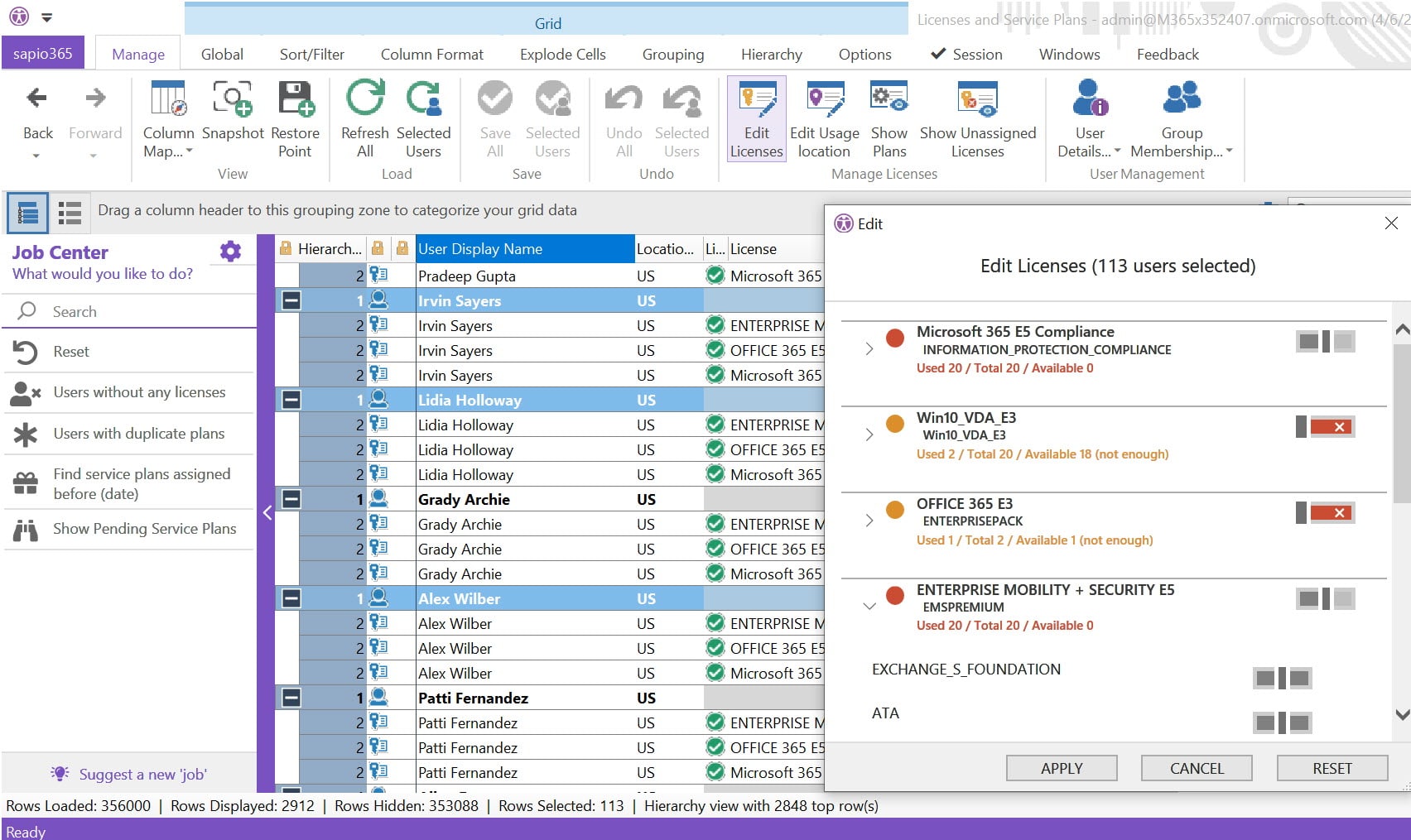
Find what you need fast
Get 360-degree visibility of your user, group and SharePoint site data and the analytical tools to make sense of it, regardless of its volume.
sapio365 enables quick and easy creation of instant custom reports
Sort, filter, categorize and analyze your data right inside sapio365 to create the right report for the right audience. You can even create visuals like charts and pivot tables.
Delegate in all security to non-technical staff
Prevent frustration at all levels and assign tasks to line-of-business managers so that they can generate the reports they need with 1 click. This is easy to do with the option available on sapio365 to automate more complex jobs.
Automate complex tasks
Every feature in sapio365 can be used programmatically. Use ready-to-run Automation Jobs Library (AJL) Jobs, create your own or let Ytria create customs jobs for you.
Manage and make bulk changes confidently with security
Instead of going in blind with a PowerShell script, prevent errors when you make large scale changes with sapio365’s transparent two-step saving process.
Schedule tasks during off hours
Optimize your bandwidth usage by running Automation Jobs Library (AJL) tasks when your users are not working. This automation feature will enable you to work on more pressing tasks that require more energy and manage your time more efficiently.
sapio365 - Microsoft Office 365 User Activity Report
Microsoft Office 365 User Activity Report – Enhanced Activity Reports for a Clear Overview of your Microsoft 365 User Activity
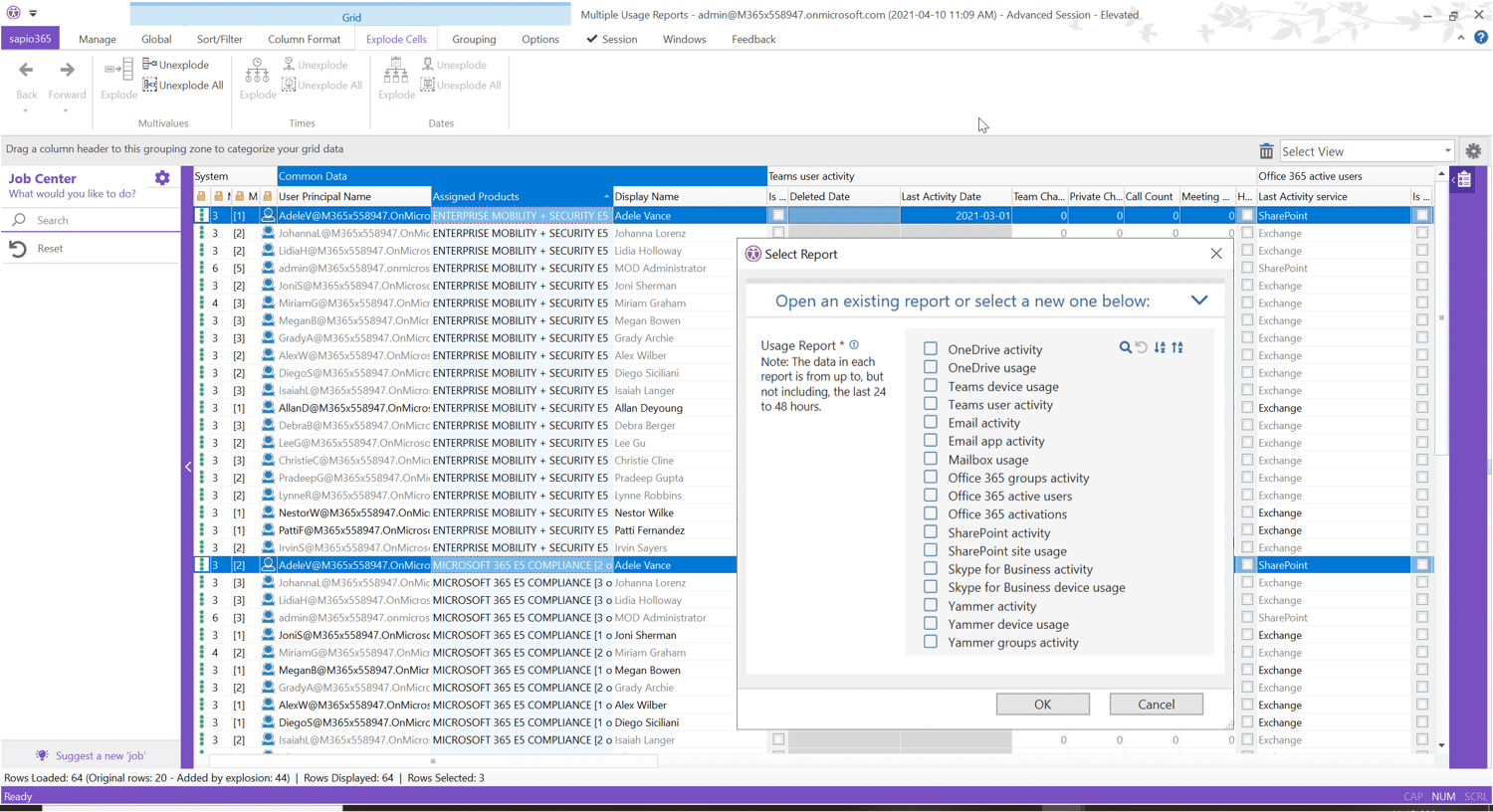
Usage reports are essential to measuring adoption, engagement, and in some cases productivity. sapio365 gives you enhanced usage activity reports in mere clicks. From OneDrive and SharePoint activity to Teams user activity, to Yammer and Skype for Business activity, detailed usage reports are yours, fast.

Unlike the reports available in the native tools, sapio365’s usage activity reporting functionality takes advantage of the FlexyView grid’s ability to organize and clarify date to give you a wide range of reporting options. Add in extra information to your report in only a couple clicks, for reporting that goes beyond the traditional scope.
From the moment you open sapio365, you know that your tenant data is within reach fast. Microsoft 365 usage reports have never been this easy, or this in-depth. No coding in sight.
Unparalleled productivity for you and your team with sapio365’s activity and performance reports
Gain 360-degree visibility
Increasing the visibility of its users is at the center of sapio365, and its reporting feature is the perfect tool to achieve the 360-degree visibility you are looking for. See a full view of all tenant data, from a high-level overview to a deep dive—all in one place and at an unmatched scale. With full visibility through reports, users are able to identify which aspects of the company are working efficiently and which are not. Using these reports, changes can be made to improve the situation. A 360-degree visibility on reporting allows organizations to find issues faster and accelerate the process of problem-solving on Microsoft 365.
Easy management using preset usage report configurations
sapio365 gives you a range of preset usage reports to choose from to view and export as is, or to enhance! This allows for a strong report structure, to which companies can add according to their specific activity and key performance indicators. Using sapio365 for your activity report management allows you to configure the reports to focus on the aspects that matter the most. Choose the content you want to see within your reports by adding in comments, extra property information, and more.
Clarify your administration workflow in clicks, not code
Call up all data and explore it fast thanks to the FlexyView grid’s various built-in analysis tools. No PowerShell needed. Simplicity and efficiency are crucial for reports, and removing the coding portion leads to significant economies of time for its user and better administration workflow. Ensure your activity reports provide accurate and useful information with sapio365.
Quickly craft detailed reports of your tenant’s data and activities
With sapio365’s FlexyView grid, what you see is what you get in terms of reporting. Simply copy and paste directly from the UI, or export data to charts, spreadsheets, HTML, or CSV.
Email activity reports
Considering the usual high volume of emails found in businesses, it can be difficult to keep track of the important ones in Microsoft 365. sapio365 is able to create and view email activity reports to monitor user emails and mailbox usage. Access these reports on your mobile device.
sapio365 makes our life easier!
With sapio365, I bring my cloud and on-premises accounts together in one place. I no longer have to search for them in one tool and then another – it really helps to avoid errors and problems. sapio365 makes our life easier!
 Stéphane Bergeron – IT Director
Better manage your Microsoft 365 data by leveraging preset, augmented reporting configurations to quickly see…
OneDrive usage and activity
Teams device usage and user activity
Email client activity
Mailbox usage
Microsoft 365 activations, group activity, and active users
SharePoint activity and site usage
Skype for Business activity and device usage
Yammer device usage and group activity
And that’s only the beginning.
Explore other unique capabilities of sapio365
Want to know more?
sapio365 - Microsoft 365 analytics tools
Deep Microsoft 365 Analytics Tools to Help You Understand and Report your Tenant Data
sapio365 is a software that gives you unmatched, unified visibility into all aspects of your Microsoft 365 tenant and user data. This is an easier and more efficient workflow for all administration tasks: from user accounts to groups, from mailboxes to OneDrive and document libraries, Teams to SharePoint sites—all without the need to code.

This is the #1 Microsoft 365 analytics tools on the market
At the heart of the advantage of an efficient workflow for the workforce with this software is the patented FlexyView grid—a customizable “actionable reporting” interface jam-packed with tools to help you make sense of your data. Filters, sorting, categorization, search, charts, statistics, and much more help you understand and clarify your data so you can take informed actions or report what you discover.
Microsoft 365 is a complex program that can be difficult to grasp for many, Ytria’s software is there to help. There are many helpful functionalities that you are able to access with sapio365 to facilitate the use of Microsoft 365. Whether you want to edit settings, analyze your tenant and user data, or create detailed reports, sapio365 is your central platform to see it all, and act as needed.
Unparalleled productivity for you and your team with sapio365

Gain 360-degree visibility into your Microsoft 365 data
This Microsoft 365 analytics tool software is ideal to see a full view of all tenant data reports, from a high-level overview to a deep dive—all in one place and at an unmatched scale. Increasing the visibility of an organization's reports and data helps with the efficiency to identify issues faster and allows time to find solutions before problems get out of control.
Clarify your administration workflow on Microsoft 365 in clicks
Call up all data and explore it fast thanks to the FlexyView grid’s various built-in analysis tools. No PowerShell needed nor coding knowledge needed either. With this app, you will have increased visibility and insight into emails, calendar, meetings, and many more. A structured schedule will help the workforce remember events more easily. Reduce tardiness and missed meetings with a clarified workflow!
Save your custom reporting configurations in all security
sapio365 gives you a wide range of tools and flexibility to help you examine your data, whether for reporting or taking action. Save any view configuration to recall at any time. Rest easy knowing that all the usage of these workplace analytics tools is done under strong security. We take your privacy seriously and sapio365 was created to be a secure software for all sensible data and reports.
Quickly craft detailed reports of your tenant data, fast
With sapio365’s FlexyView grid, what you see is what you get in terms of reporting. Simply copy and paste directly from the UI, or export data to charts, spreadsheets, HTML, or CSV. sapio365 is a software that is user friendly and one of its key selling points is its easiness to learn your way around the software. There is no time wasted when you start using sapio365, on the contrary, the only time spent with sapio365 is on the expansion of your company. In addition, Ytria provides quality after-sale customer service to answer any questions or concerns.
sapio365 makes our life easier!
With sapio365, I bring my cloud and on-premises accounts together in one place. I no longer have to search for them in one tool and then another – it really helps to avoid errors and problems. sapio365 makes our life easier!
Stéphane Bergeron – IT Director
Better manage your Microsoft 365 data by leveraging a wide range of built-in tools to analyze, act, and report, such as…

Categorization, sorting, and filters
- Drag and drop categorization
- Text, number, value, and regex filters
- Column sorting
- Data hierarchy visualization
- Grid-wide searches (regex operations)
Deep analysis and reporting tools
- Custom chart configurations
- Grid-data pivot tables
- Statistical calculations
- Duplicate value detection
- Multi-format data exports
In-grid custom data, formatting, and comparisons
- Editable in-grid commenting
- Value and column comparisons
- Custom date, text, and cell formatting
- Text-to-date and number value conversions
- Calculated totals, counts, and averages
And that’s only the beginning.
Explore other unique capabilities of sapio365
Want to know more?